Five9 connected mode · beta
Import and upload Five9 IVR scripts straight from Five9
Skip the export and re-import steps. Connect with a Five9 login, pick the scripts you want, edit them, and upload them back under a new name or over the original. Your login never leaves your browser except to pass each request on to Five9.
What it does
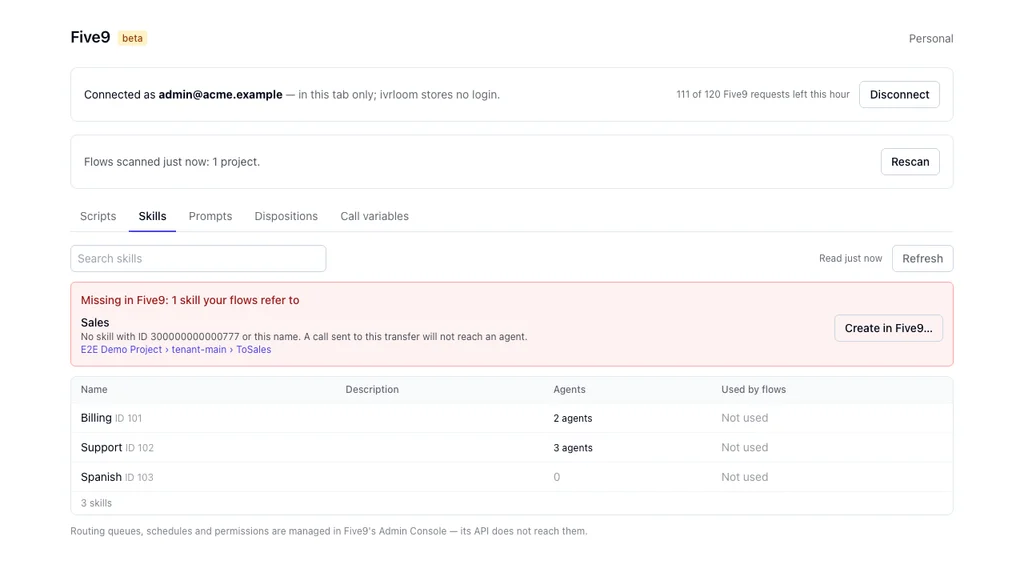
- Shows what your IVRs depend on in Five9. The Five9 page lists your domain's scripts, skills (with the agents who hold each one and their level), prompts, dispositions and call variables, and which script each inbound campaign runs by default. Choose Scan my projects and each item shows which of your flows use it — one click opens that module in the editor — and a banner lists what your flows refer to that Five9 does not have, with Create in Five9 for a missing skill, disposition or prompt, and Add agents gives a skill to many agents at once — reviewed, and confirmed by typing how many. The scan runs in your browser and is kept there; nothing read from Five9 is stored by ivrloom. Take snapshot records what the domain has at that moment — skills with how many agents hold each, prompts, dispositions, call variables, campaigns and a fingerprint of every script — and Compare shows what changed between two snapshots: a skill removed, a script changed in Five9, a campaign now running another script. Snapshots stay in your browser, or download one to keep with a change ticket, or save one to the workspace so the team can compare it on any device (a workspace owner or admin can turn that off).
- Keeps you in step with Five9. Each flow imported from Five9 remembers which script it came from and shows whether you edited it, someone changed it in Five9, or both. Save to Five9 writes it back under the same name and, if Five9's copy changed since you imported it, shows the difference first instead of overwriting. Pull latest from Five9 brings Five9's copy in, and Upload changed flows sends every edited flow at once, sub-scripts first, skipping any that changed in Five9. Start a project straight from your Five9 scripts with Open from Five9.
- Checks what a flow depends on. Before an upload, ivrloom checks that the skills, prompts, dispositions, call variables and sub-scripts the flow uses exist in your Five9 domain, and lists anything missing. While you are connected, each module on the canvas shows what it uses in Five9 — a green tick when Five9 has it, a red cross when it does not — and a click on a cross opens the form that creates it.
- Creates what is missing. Create a skill from a transfer — and assign agents to it — and the transfer is linked to the new skill. Create a disposition or a text-to-speech prompt in Five9 from the editor. Five9 does not tell ivrloom the new prompt's or disposition's ID, so linking those into a module waits until Five9 has assigned one; a module can always speak text-to-speech of its own, which needs no ID.
- Uploads recorded prompts in any common audio format. Five9 accepts prompt audio only as WAV, G.711 µ-law, mono, 8 kHz. Choose Upload audio prompt… on the Five9 page's Prompts tab, or Recorded audio when you create a prompt from the editor, and drop an MP3, WAV, M4A, OGG or FLAC file: ivrloom converts it in your browser, lets you hear it as callers will, and adds it to your Five9 prompt library in one step. The audio passes through ivrloom's server to Five9 and is not kept. Drop many files at once and each becomes its own prompt, named from its file name (you can edit the names); a name Five9 already has is skipped, and the batch must fit the hourly request allowance. Without connected mode, the free prompt audio converter does the conversion and you upload the file in Five9 yourself.
- Replaces a recorded prompt's audio. On the Prompts tab, Replace audio… next to a recorded prompt takes a new MP3, WAV, M4A, OGG or FLAC file, converts it in your browser, and — once you type the prompt's name to confirm — sends it to Five9. Every flow that plays that prompt plays the new audio at once. Five9 keeps no earlier version and its API cannot read the current audio out, so ivrloom cannot undo it: keep your own copy of the old file. The prompt's description and languages stay as they were. A text-to-speech prompt cannot take a recording.
- Finds what no IVR script refers to. On the Five9 page, ivrloom reads every IVR script in the domain and lists the prompts, skills, dispositions and call variables that none of them refers to, with a CSV download. That means not referenced by any IVR script, not unused: campaigns, queues, agent settings and the Five9 console can still use them, so check before you remove anything in Five9. ivrloom only reads; it removes nothing.
- Traces a phone number to its IVR. On the Campaigns tab, Map phone numbers reads the numbers (DNIS) assigned to each inbound campaign. Search any number, in any format, to see which campaign it reaches and which IVR script that campaign's default schedule runs; download all numbers as CSV. Five9's API gives only the default IVR schedule, so a script switched in by another schedule rule is not shown.
- Gets a flow ready for the next holiday. The editor's 🕒 Hours dialog has a checklist: the script's holiday dates are up to date (rolling them forward to next year is on paid plans), the greeting's audio is replaced, and the script is saved back to Five9 — or exported, without connected mode. See updating a Five9 holiday greeting.
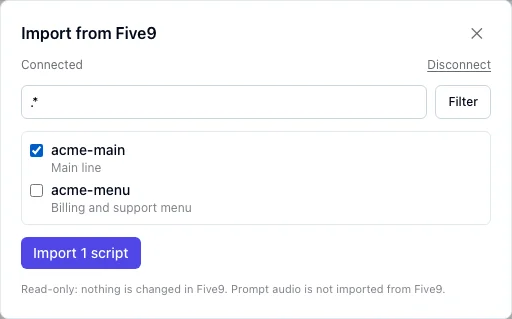
- Lists and imports your IVR scripts. Open a project, choose Import from Five9, sign in to Five9, and pick scripts from the list — or use Select all to take every script the filter shows in one go. They load into the same editor, simulator and Issues panel as an exported file.
- Uploads a script back to Five9. In the ⋯ menu above the list of flows, choose Upload to Five9 and a name. A new name creates a new script, so you can try a change beside the live one. A name Five9 already has replaces that script once you type the name to confirm. The same check as the download runs first, and anything that would not export as shown blocks the upload. Afterwards ivrloom reads the script back and tells you whether Five9 holds exactly what was sent.
- Checks transfers against your real skills. Connecting also reads your skill list, so the Issues panel can flag a transfer to a skill that no longer exists in Five9 — the kind of break an exported file alone can't reveal.
What it does not do
- It never deletes anything in Five9, and it writes only when you upload or save a script, create a skill, disposition or prompt, replace a recorded prompt's audio, or assign agents to a skill.
- It does not keep a copy of a script it replaces. To keep the version in Five9, upload under a new name. It cannot keep a copy of prompt audio it replaces either, because Five9's API cannot read that audio out.
- It does not import prompt audio, or upload the recordings inside an exported bundle. An uploaded script refers to prompts, skills and sub-scripts by name and ID, so they must already exist in that Five9 domain. A recording you upload as a new prompt cannot be linked into a module from ivrloom, because Five9's API gives prompts no ID; choose it in Five9's designer.
- It does not run in the background. ivrloom has no copy of your login, so nothing reads Five9 unless you are in the app and connected.
How your Five9 login is handled
The login stays in your browser: in memory by default, or for the current tab only if you tick Keep it for this tab. Five9's API cannot be called from a browser directly, so each request passes through ivrloom's server, which uses the login for that request and then discards it — it is never written to our database, files or logs. We record that you connected, when, and which consent text you agreed to; never the login itself. More on the Security & Privacy page.
Why beta
Connected mode is built on Five9's published administration API. Five9 domains differ in how their users and permissions are set up, so if a login is refused or a script does not come through the way it looks in Five9, or an upload does not match what you sent, tell us — use the feedback button in the app or email hello@ivrloom.com.
Plans
Included in Team. On Solo, add it for $19 a month from the Billing page and remove it any time. The Free plan works from exported files. See Pricing.
How to turn it on
- Create a free account and open a project.
- On Free, Import from Five9 shows with a lock and links to the Billing page. Choose Team, or choose Solo and then add connected mode on the same page.
- Back in the project, choose Import from Five9. It is on an empty project and, once a bundle is open, in the ⋯ menu above the list of flows, next to Upload to Five9.
Questions
Does ivrloom store my Five9 password?
No. The login is kept in your browser — in memory, or for the current tab if you tick that box — and sent to ivrloom's server only to pass each request on to Five9. The server uses it for that one request and never writes it to a database, a file or a log. Closing the tab or signing out discards it.
Can connected mode change anything in Five9?
Only when you ask it to. Reading — scripts, skills, prompts, dispositions, call variables and your users' names — changes nothing. It writes when you upload or save a script (under a name Five9 already has, it replaces that script only after you confirm, and the version in Five9 is not kept), when you create a skill, disposition or prompt (text-to-speech or a recording you upload), when you replace a recorded prompt's audio (after typing its name), or when you assign agents to a skill. ivrloom never deletes anything in Five9, and you can still download the bundle and re-import it yourself instead.
Which Five9 user should I connect with?
A dedicated Five9 user with the least access your Five9 domain allows for reading IVR scripts and skills, and for creating and changing what you will write — scripts, skills, dispositions or prompts. A full administrator login works, but it can do everything an administrator can, so it is worth not using one here.
Which plans include it?
Team includes it. On Solo it is an add-on for $19 a month, added or removed on the Billing page and prorated by Stripe. The Free plan uses exported files only.
Is my prompt audio imported?
No. Connected mode imports the scripts themselves. Prompt audio still comes from an exported .zip if you want to play it in the editor. You can upload new recordings to Five9's prompt library, or give an existing recorded prompt new audio, though: choose MP3, WAV, M4A, OGG or FLAC files and ivrloom converts them in your browser to the format Five9 takes before sending them. Five9's API cannot read a prompt's current audio out, so ivrloom cannot play or back up what Five9 has now.
Prefer exported files?
Every plan works from a Five9 export, with no Five9 login at all. See how it works.