For Five9 admins
A modern Five9 IVR Script Designer alternative.
ivrloom edits your Five9 IVR in the browser — bulk edits across flows, AI refactors, call simulation, and PR-style review. No Java app to launch, no API access required, and your .zip is never uploaded.
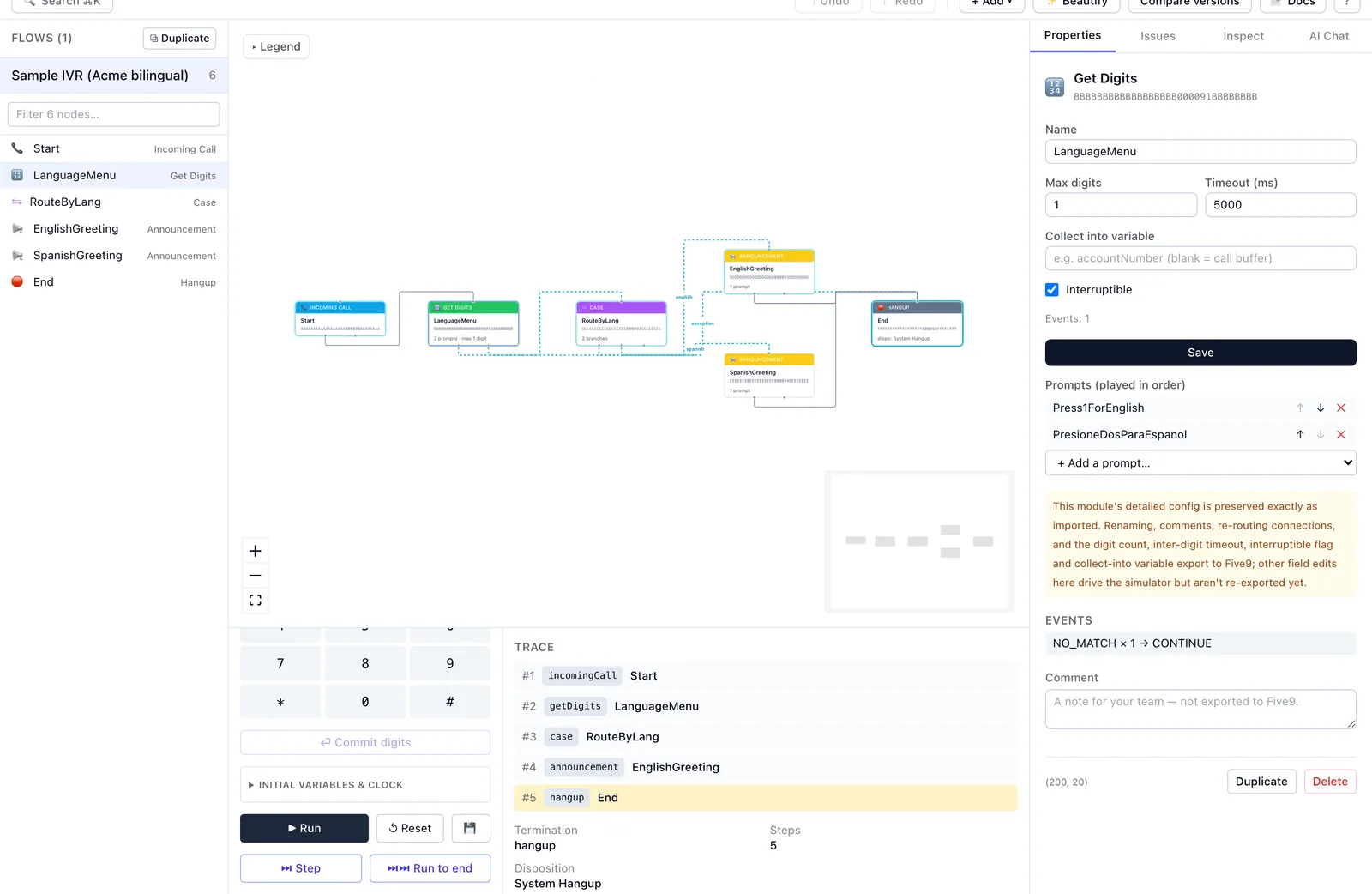
Why admins switch
The Five9 IVR Script Designer does the job, but it's a desktop Java application from another era: slow to start, no way to make the same edit across multiple flows, an undo you can't fully trust, and no record of what changed. A routine prompt update becomes an afternoon of clicking — and a crash mid-edit can cost you the work. ivrloom replaces that with a fast, modern editor that treats your IVR the way you'd treat code: versions you save are kept, so you can see what changed and go back.
Edit your Five9 IVR in the browser — no Java to install
The Five9 IVR Script Designer is a Java desktop application: you wait for it to launch, keep
a runtime updated, and you're tied to a machine that has it installed. ivrloom has nothing
to download. Open a tab, drop in your exported
.zip, and
you're editing — on macOS, Windows, or Linux, on whatever machine you're sitting at. No
installer, no admin rights, no Java startup screen, and nothing to patch when the next
version ships.
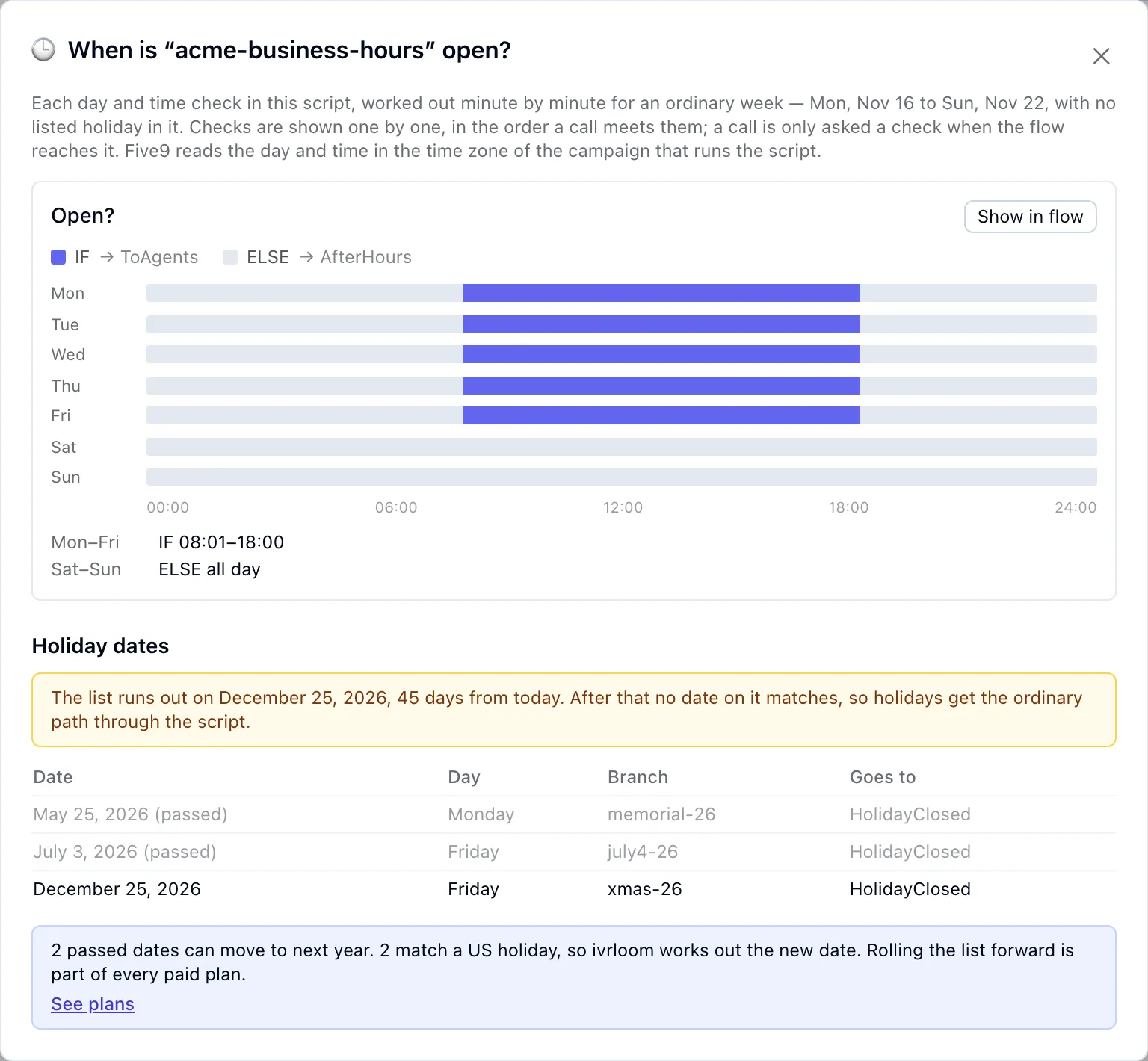
See when your IVR is open — and whether its holiday list has run out
Business hours and holidays usually live in a chain of If/Else and Case checks on the day, the time and the date. ivrloom works out what each check answers at every minute of an ordinary week and draws it, using the same logic as its call simulator — so "Monday to Friday, 8 to 6" is something you see, including the edge the condition really draws: a check that says "more than 08:00" opens at 08:01.
The holiday dates a script checks for are listed next to it, with the ones that have passed greyed out. A date in a script is a fixed year, month and day, so once the last one passes, holidays quietly get ordinary hours — ivrloom tells you when that has happened, or is less than 60 days away, the moment you import. The hours view is free on every plan. On a paid plan, the passed dates roll to next year in one step: US federal holidays are worked out from their rule, including the weekday a weekend holiday is observed, and any date ivrloom does not recognise is left for you to fill in. For the routing patterns themselves, see hours-of-operation routing that holds up.
ivrloom vs the Five9 IVR Script Designer
| Capability | Five9 Designer | ivrloom |
|---|---|---|
| Runtime | Java desktop app, slow to launch | Browser — instant, nothing to install |
| Bulk edits across flows | No — one flow at a time | Yes — one change across every flow |
| Undo / redo | Unreliable | Reliable undo and redo of your last 100 edits |
| Version history | None | Save versions, reopen any earlier one, open a pull request against it |
| Search | Limited | Search across all flows |
| Cross-flow refactor | Manual, flow by flow | Rename a prompt or reroute a skill everywhere at once |
| AI assistance | None | Built in — proposal-only, you approve every change |
| Questions across flows | None — open each flow and read it | Ask the AI where a prompt plays or a field is read in every flow, and which routes skip it |
| Call simulation | No | Yes — queue DTMF, watch the trace step through |
| Change review | None | PR-style diff of every edit, to check before download |
| Flow linting | — | Issues panel flags unreachable nodes, dead ends, missing prompts, endless loops |
| Flow documentation | None | One-click Markdown export of any flow |
| Prompt audio preview | — | Play prompt recordings in the browser |
| Round-trip safety | — | Unknown node types preserved byte-for-byte |
| Auto-layout | Manual | Tidy the graph on demand; lines route around blocks |
| Keyboard shortcuts | Minimal | Keyboard-first |
| Your data | On Five9 | The .zip stays on your machine; projects save to ivrloom |
| Price | Bundled with Five9 | Free tier, then $29/mo |
How switching works
There's nothing to rip out. ivrloom runs alongside Five9 — it edits the same
.zip bundle the
admin console already exports.
- 01
Export from Five9
Use the Five9 admin console's IVR Scripts export to download a
.zip. What is inside it: reading a Five9 export by hand. - 02
Edit in ivrloom
Drop the
.zip. Edit visually, bulk-refactor with AI, simulate calls, and review every change as a diff. - 03
Re-import to Five9
Download the modified
.zipand re-import it in Five9 as usual. No integration, no API access.
Questions about switching
- Do I have to stop using the Five9 IVR Script Designer?
- No. ivrloom runs alongside Five9 — it edits the same .zip bundle the admin console exports, so you can switch on a single change or keep both. Nothing in Five9 changes until you re-import. See the getting-started guide for the step-by-step.
- Do I need to install Java or download anything to use ivrloom?
- No. ivrloom runs entirely in your browser — there's no Java desktop app, no installer, and nothing to download or keep updated. The Five9 IVR Script Designer is a Java desktop application; ivrloom replaces it with a browser editor that works on any OS.
- Does ivrloom need access to my Five9 account?
- Not by default. You upload an exported .zip, edit in your browser, and download a modified .zip to re-import yourself — no Five9 login needed. On Team, or Solo with the $19/month add-on, optional Five9 connected mode (beta) can import scripts straight from Five9 and upload edited ones back, as a new script or replacing one after you confirm; your Five9 login stays in your browser.
- Will switching break my IVR?
- ivrloom is round-trip safe: node types it doesn't recognize are preserved byte-for-byte. Every edit can be checked as a PR-style diff before you download, and AI changes are applied only after you approve them. Re-import as you would any IVR bundle.
- How much does it cost compared to the Five9 Designer?
- The Five9 Designer is bundled with Five9; ivrloom adds a modern editor on top. It's free to start with no credit card, then $29/mo for Solo and $99/mo for Team.
Stop dreading IVR changes.
Free to start, no credit card. Your .zip is parsed in your browser and never uploaded;
your projects save to ivrloom automatically, and AI is opt-in.